
With over 820 million active crypto wallets globally as of 2025 (CoinLaw), getting started with your own wallet has never been more straightforward — but the setup decisions you make in the first 10 minutes have real long-term consequences. Choose the wrong wallet type, skip the seed phrase backup, or download from a fake site, and you’re in a bad spot with no one to call.
This guide covers how to set up a crypto wallet step by step: what type to choose, how to create MetaMask and Trust Wallet, how to set up a Ledger or Trezor, how to fund it, and how to keep everything secure.
Over 820M crypto wallets are now active worldwide (CoinLaw, 2026). A software wallet takes 5–10 minutes to create. A hardware wallet takes 20–30 minutes. Either way, the single non-negotiable step is writing your seed phrase on paper and storing it offline — no exceptions.
What Is a Crypto Wallet and How Does It Work?
A crypto wallet doesn’t hold your coins. The coins live on the blockchain — what the wallet holds is your private key, the cryptographic proof of ownership that authorizes transactions. Think of it less like a physical wallet and more like the PIN to a bank vault you built yourself.
“Self-custody wallets store private keys locally, giving users complete control over their funds without relying on a third party,” according to Ethereum Foundation documentation on wallet security. Without a wallet holding your private keys, you can’t send, receive, or interact with cryptocurrency on-chain.
Public Keys vs. Private Keys Explained
Every crypto wallet generates two keys:
- Public key — your wallet address. Share this freely; it’s how people send you crypto. It looks something like 0xA71b3…4e22 for Ethereum.
- Private key — the signature that authorizes every outgoing transaction. Share this with no one, ever.
Lose the private key with no backup? The wallet — and everything in it — is gone permanently. There’s no password reset, no support ticket, no recovery team. That’s the deal with self-custody: full control, full responsibility.
Custodial vs. Non-Custodial Wallets
This is the most important choice you’ll make, and most beginners don’t realize they’re making it.
- Custodial wallets (exchange accounts like Coinbase or Binance) hold your private keys for you. Convenient. But if the exchange is hacked, goes insolvent, or freezes withdrawals — your funds are at risk. FTX taught that lesson to roughly a million people.
- Non-custodial wallets (MetaMask, Trust Wallet, Ledger) give you the private keys directly. You own them, you control the funds, you bear the responsibility.
The crypto shorthand: “Not your keys, not your coins.” It’s a cliché because it’s true.
What Are the Different Types of Crypto Wallets?
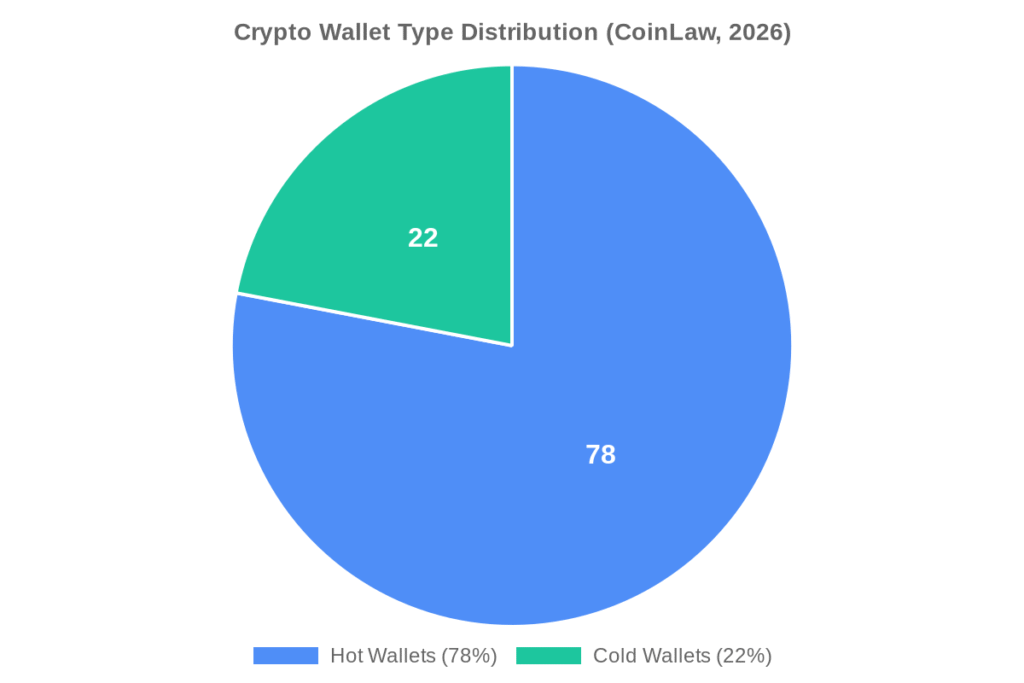
Roughly 78% of all wallets in use today are hot wallets — internet-connected software wallets (CoinLaw). That’s where most people start, and it makes sense for small amounts and active use. But there are four main types, and the right one depends on how you plan to use crypto.
| Wallet Type | Best For | Security Level | Cost |
|---|---|---|---|
| Software/Hot Wallet | Daily use, DeFi, NFTs | Medium | Free |
| Hardware/Cold Wallet | Long-term storage, large holdings | High | $79–$249 |
| Exchange Wallet (Custodial) | Trading, absolute beginners | Varies (third-party) | Free |
| Paper Wallet | Cold storage (advanced users) | High (if stored right) | Free |
Software Wallets (Hot Wallets)
MetaMask, Trust Wallet, Exodus, and Phantom are all software wallets — apps or browser extensions you download, control, and use directly. No fees to create, broad network support, and you’re set up in under 10 minutes. The trade-off: they’re connected to the internet, which introduces exposure to phishing, malware, and browser exploits. For amounts under a few hundred dollars and active daily use, most people consider that a reasonable risk.
72% of crypto users now prefer mobile-first wallet solutions (CoinLaw), which explains why Trust Wallet and MetaMask mobile have both overtaken their desktop versions in active users.
Hardware Wallets (Cold Storage)
Ledger and Trezor are physical devices that keep your private keys offline. Transactions still go through, but the private key never touches the internet — you approve each transaction on the device itself. Given that FBI data puts cybercrime losses at $16.6 billion in 2024 (FBI IC3 Annual Report, 2024), cold storage removes your stored holdings from that risk environment entirely. Hardware wallets run $79–$249 depending on the model.
Paper Wallets
A paper wallet is your public and private keys printed on paper. Zero digital footprint, genuinely offline. The practical problems: paper burns, floods, fades, and can be read by anyone who finds it. For most people, a hardware wallet is more practical cold storage. Paper wallets are mainly used by very experienced users with specific operational security setups.
How Do You Set Up a MetaMask Wallet?
MetaMask is the most widely used Ethereum wallet — a browser extension for Chrome, Firefox, Brave, and Edge, with an iOS and Android app as well. Setup takes about five minutes. Here’s exactly how.

Step 1: Install MetaMask
Go to metamask.io — and only metamask.io. Copy-cat phishing sites have been set up on dozens of lookalike domains. Once there, click “Download” and select your browser. The extension installs in seconds.
Step 2: Create a new wallet
Open the extension, click “Create a new wallet,” agree to the terms, and set a password. This password only unlocks MetaMask on your specific device — it’s not your private key. You can’t use it to restore your wallet on another device.
Step 3: Save your Secret Recovery Phrase
This is the step that matters most. MetaMask shows you 12 words. Write every single one down, in order, on paper. Store that paper in a physically secure location — your home safe, a safety deposit box, a sealed envelope with a trusted family member. Not in a photo on your phone. Not in a note app. Not in your email drafts. Anyone who has these 12 words has permanent, complete access to your wallet.
Step 4: Confirm your phrase
MetaMask asks you to re-enter several words in sequence to confirm you wrote the phrase correctly. Don’t click through this quickly. If you made a transcription error, you’ll discover it now — not after you’ve loaded $10,000 into the wallet.
Step 5: Fund your wallet
Your Ethereum address appears at the top of the extension. You can now receive ETH and ERC-20 tokens. To buy directly within MetaMask, use the “Buy” button — it routes through third-party on-ramp providers like MoonPay or Transak with fees around 2–3%.
My first MetaMask setup took about eight minutes, and six of those were spent finding a pen. Once I had one, I wrote the seed phrase down twice — two separate pieces of paper, stored in different physical locations. That probably sounds over the top for a wallet holding $150 worth of ETH. But the habit itself is the point. You’re not just protecting $150; you’re building the process you’ll use when the amounts get bigger.
How to Create a Trust Wallet
Trust Wallet is mobile-first, supports 100+ blockchains in one app, and is non-custodial — Binance owns the company, but Binance does not hold your keys. It’s a strong choice if you’re working across multiple chains and want everything in one place.
Step 1: Download Trust Wallet from the App Store (iOS) or Google Play (Android). Verify you’re downloading the official app — search results have occasionally surfaced fake versions.
Step 2: Open the app and tap “Create a new wallet.”
Step 3: Back up your 12-word recovery phrase. Same rule as MetaMask — paper, offline, secure location.
Step 4: Verify the phrase by tapping the words in the correct sequence.
Step 5: Your wallet is ready. From the main screen, tap “+” to add specific coins and networks to your portfolio view.
If you want to understand Trust Wallet’s full feature set before committing to it, read our complete Trust Wallet review on Tradelize — we’ve covered fees, security record, DeFi support, and the things it doesn’t do well.
How Do You Set Up a Hardware Wallet?
A hardware wallet setup takes 20–30 minutes the first time, but the security improvement over software-only storage is significant. The two most widely used options are Ledger and Trezor.
Setting Up Ledger
- Buy from Ledger.com directly. Avoid Amazon, eBay, and other third-party resellers — tampered Ledger devices have been reported in the wild. If the device arrives with a pre-filled recovery phrase or a pre-set PIN, do not use it.
- Download Ledger Live on your desktop from ledger.com/ledger-live.
- Connect the device via USB and follow the on-screen setup wizard in Ledger Live.
- The device generates a 24-word recovery phrase. Write it on the recovery sheet included in the box. Ledger explicitly states: do not store it digitally. When setup is done, disconnect the device and store the phrase separately from it.
- Install apps for specific cryptocurrencies within Ledger Live (Bitcoin, Ethereum, Solana each require their own app on the device).
- Set a PIN on the device — this locks the physical hardware if it’s ever stolen.
Setting Up Trezor
The process mirrors Ledger: purchase from trezor.io, download Trezor Suite, connect via USB, follow the wizard, generate and record your 12 or 24-word seed phrase, set a PIN. Trezor additionally supports a passphrase (an optional 25th word) — this creates a hidden wallet that’s inaccessible even if someone has the physical device and your recovery phrase.
For a side-by-side comparison of specific models, see the crypto wallet reviews section on Tradelize. The $79–$249 hardware cost is worth taking seriously once you’re storing amounts that would genuinely hurt to lose.
How to Fund Your Crypto Wallet
Once your wallet exists, you need to get crypto into it. Three main methods:

Method 1: Buy directly within the wallet
Most software wallets integrate on-ramp services like MoonPay, Transak, or Ramp. You enter a card, pay in fiat, and crypto lands in your wallet. Fees run 1.5–3.5%. Convenient, but more expensive than transferring from an exchange.
Method 2: Transfer from a centralized exchange
Buy crypto on Coinbase, Binance, Kraken, or a similar exchange. Then use their withdrawal function, paste your wallet address, select the correct network, and send. This is the most cost-effective route — you mainly pay blockchain gas fees. Always test with a small amount first. Crypto transactions cannot be reversed.
Method 3: Receive from another wallet
Share your public wallet address. The sender enters it into their wallet’s “Send” function, confirms the amount and network, and the transaction processes on-chain — typically within seconds to a few minutes depending on network congestion.
The mistake that costs beginners money: sending the wrong token on the wrong network. USDC on Ethereum and USDC on Polygon are the same token on different blockchains. The receiving wallet needs to support the exact network you’re sending on. When in doubt, check twice. Recovery is possible but complicated.
How Do You Keep Your Crypto Wallet Secure?
The FBI recorded $16.6 billion in cybercrime losses in 2024 (FBI IC3 Annual Report, 2024) — and crypto theft makes up a significant portion of that. The good news: the vast majority of crypto wallet compromises are preventable. They don’t happen because wallets are inherently insecure; they happen because of predictable, avoidable user errors.

Protect your seed phrase above everything else
The seed phrase is the wallet. Not the app, not the device — the phrase. Write it on paper, in pen. Consider a fireproof, waterproof metal backup (products like Cryptosteel or Bilodot are specifically designed for this). Store copies in multiple physical locations. Never photograph it, never type it into any app or website, never give it to anyone describing themselves as “wallet support” — no legitimate wallet company will ever ask for it.
Use an authenticator app for 2FA, not SMS
For custodial wallets and exchange accounts, SMS-based two-factor authentication is vulnerable to SIM-swap attacks. Use an authenticator app (Google Authenticator, Authy, or hardware-based authentication via a YubiKey) instead.
Verify wallet addresses character by character
Address poisoning attacks work by sending a trace amount from a wallet address that looks nearly identical to one you’ve previously used. If you copy-paste your last recipient without checking, you might send to the attacker’s address instead. Check the first four and last four characters of any address before confirming a transaction.
Use cold storage for significant holdings
“Significant” is relative, but a useful mental benchmark: if losing it would hurt, store it offline. A hardware wallet for long-term holdings, a software wallet for active daily use — that’s the standard setup among experienced crypto users.
For a deeper look at cold storage strategies, read our guide to the safest ways to store crypto.
What Are the Most Common Mistakes Beginners Make With Crypto Wallets?
These are the patterns that actually cost people money — not obscure attack vectors, but simple, repeatable errors:
1. Storing the seed phrase digitally
Google Drive, iCloud Notes, password managers, email drafts — all of these have been compromised at scale. The seed phrase belongs on paper, stored physically. This is the single most common cause of wallet loss.
2. Downloading wallets from fake sites
MetaMask, Ledger, and Trust Wallet have all been impersonated on lookalike domains. Always navigate directly to the official URL and cross-check the domain in the browser bar before entering any information or downloading anything.
3. Sending on the wrong network
A transaction sent on the wrong network doesn’t arrive — it either disappears or gets stuck, depending on the specific situation. Check the network every time. Your wallet should clearly display both the asset and the network before you confirm.
4. Skipping the seed phrase verification step
Both MetaMask and Trust Wallet require you to confirm your phrase after writing it down. Some users click through quickly or guess at words they’re not certain about. A single wrong word means the phrase doesn’t work. The verification step is there to catch that error before it matters.
5. Leaving everything in exchange wallets
Exchanges can freeze withdrawals, get hacked, or collapse entirely. Custodial risk is real and has materialized for millions of users. Moving holdings to a self-custody wallet isn’t just good practice — it’s the appropriate response to that risk.
If you’re evaluating which specific non-custodial wallet fits your situation, the Exodus, ZenGo, and Coinbase Wallet reviews on Tradelize cover the specifics in detail.
The Bottom Line on Setting Up Your Crypto Wallet
Setting up a crypto wallet is one of the most practical things you can do as a first step into cryptocurrency. Choose MetaMask or Trust Wallet for everyday software use, or Ledger/Trezor for long-term storage of meaningful amounts. Whichever you pick, write your seed phrase on paper, store it offline, and don’t share it with anyone. That single habit protects you from the vast majority of crypto wallet losses.
Ready to compare specific wallets before you decide? Our full crypto wallet reviews on Tradelize cover fees, security, multi-chain support, and real user feedback across the top options.
Frequently Asked Questions
Do I need a crypto wallet to buy Bitcoin?
Not necessarily — you can buy Bitcoin on a centralized exchange like Coinbase or Binance and leave it in their custodial wallet. But if you want true self-custody, where only you control access, you’ll need your own non-custodial wallet. Most serious long-term holders eventually move to self-custody.
What happens if I lose my crypto wallet device or phone?
Your crypto isn’t on the device — it’s recorded on the blockchain. As long as you have your seed phrase, you can restore your wallet on any compatible device or app. This is exactly why backing up the seed phrase is the most critical step in the entire setup process.
Can I have multiple crypto wallets?
Yes, and many experienced users maintain several. A common setup: a hardware wallet for long-term storage, MetaMask for DeFi and NFT activity, and an exchange account for trading. There’s no technical limit to how many wallets you create or operate simultaneously.
What is the safest crypto wallet for beginners?
For beginners who want ease of use without sacrificing self-custody, Trust Wallet and Coinbase Wallet are consistently recommended starting points. For maximum security, Ledger or Trezor hardware wallets are the standard answer. See our Trust Wallet review and Coinbase Wallet review for a full comparison.
How do I find my wallet address?
Open your wallet app or browser extension. Your public wallet address — the string of letters and numbers that starts with 0x for Ethereum, or a different format for other chains — appears at the top of the interface. That’s what you share to receive funds.

Our Review Methodology
We evaluate each post based on thorough research, credibility of sources, accuracy of information, and relevance to our readers. Our editorial team follows strict guidelines to ensure all content meets high standards of quality.
Disclaimer
The content in this article is provided for informational purposes only and does not constitute financial, investment, or professional advice. Always do your own research before making any decisions.


